The moment it's grabbed, it locks.
The cable is just one trigger. Moorlock detects the theft on the device itself — no network, no cloud round-trip — then locks or shuts down instantly, captures who did it, and keeps tracking until you have it back.
A cord between you and your data.
No agents to babysit, no cloud round-trip in the critical moment. The trigger fires locally, the instant the tether breaks.
Clip in
A magnetic breakaway USB cable runs from your laptop to your belt. Arm it — or let it auto-arm on wake, on battery, or off trusted Wi-Fi.
They grab it
The connector breaks away cleanly — no damaged ports, no yanked laptop. That break is the signal. An optional grace period forgives a knock.
It defends itself
Instantly locks or shuts down, sounds an alarm, photographs whoever's there, and sends you an alert with the laptop's location.
Protect. Prove. Recover.
If someone takes your unlocked laptop, Moorlock locks it before they can use it — then proves what happened and helps you get it back. Everything else serves those three outcomes.
Protect
The instant your tether breaks, the machine locks or shuts down — faster than a thief can act.
- Sensor fusion — USB, FIDO2, Bluetooth, power, Wi-Fi, wake
- Clone-proof FIDO2 tether — the secret never leaves the token
- Duress PIN and evil-maid watch
- Self-healing watchdog — restarts if it's stopped, alerts on tamper
Prove
Webcam and screen frames the moment it triggers, delivered off the machine before it's gone.
- Webcam + screen capture on trigger
- Encrypted at rest with a per-account key
- Alerts anywhere — email, Signal, Slack, webhooks
Recover
Location with every alert — and it keeps working after the network is gone.
- Approximate location on every trigger
- Works offline — reports when connectivity returns
- Theft mode — keeps tracking until you clear the incident
It reacts at the moment of theft — not after.
Detecting a USB unplug and locking a screen isn't new. Moorlock's edge is everything around it — multi-sensor detection, evidence, recovery and fleet control, all local-first.
A kill cord (like BusKill) locks on unplug — and stops there. Moorlock treats the cable as one trigger among many, and adds multi-sensor detection, evidence capture, recovery, remote response and fleet management on top.
Prey, Find My and MDM mostly help after a device is already gone. Moorlock acts at the instant of physical theft — locking the machine before your unlocked session is exposed.
Detection, lock, alarm and shutdown run entirely on-device — no network, no cloud round-trip, so they fire even with Wi-Fi cut. The cloud only adds encrypted history, recovery and fleet control.
Tether it your way.
Moorlock triggers on whatever tether you choose — a breakaway cable, a security key, your phone, the charger, or a plain USB drive. It's hardware-agnostic: bring your own, or buy the cable.
Magnetic breakaway cable
The kill cord. A magnetic connector clips you to the laptop and separates cleanly the instant it's grabbed — no damaged ports.
YubiKey / FIDO2 key
The premium tether: a cryptographically authenticated physical tether. The secret is hardware-sealed on the key and never leaves it, so unlike a keyfile it can't be copied or cloned — verified every second.
Phone or watch
Bluetooth proximity tether. Walk out of range while armed and it triggers — a dead-man's switch with no cable at all.
Power adapter
Charger tether. Snatch-and-run usually yanks the power cable first — unplug it while armed and Moorlock fires.
Any USB drive
Cryptographic keyfile. Turn a spare stick into your cord — a random secret re-checked every second. Convenient and free, though a plain keyfile can be copied; for a clone-proof tether, use a FIDO2 key.
No proprietary dock, no subscription to arm. The cable is the only optional purchase, and any magnetic-breakaway USB cable works.
On the move
- Magnetic cable on a belt clip
- Encrypted keyfile on the drive
- Evidence capture + location
Cable-free
- Power-adapter tether
- Bluetooth phone in range
- Auto-arm off trusted Wi-Fi
Coercion-ready
- YubiKey pinning
- Duress PIN + soft-shutdown
- Evil-maid wake watch
Trust is earned in the source.
Security software that watches your camera and location has to be auditable. Ours is — every line of the client is open.
Read it, build it, verify it does exactly what it says — nothing hidden.
Evidence and location are encrypted with a per-account key, so a database or storage breach doesn't expose them.
The client works fully on its own with your own alert channels. The cloud is optional.
# arm the kill cord, pinned to your cable$ moorlock arm --device 046d:c52bstatus: MOOREDtrigger: lock-screenkeyfile: verifiedtether: power + bluetooth# a disconnect now fires in ~2 seconds$ moorlock test✓ USB monitoring hotplug active✓ Keyfile pinning present & verified✓ Duress PIN decoy armed✓ Evidence cam + screen ready
See every device. Act in one click.
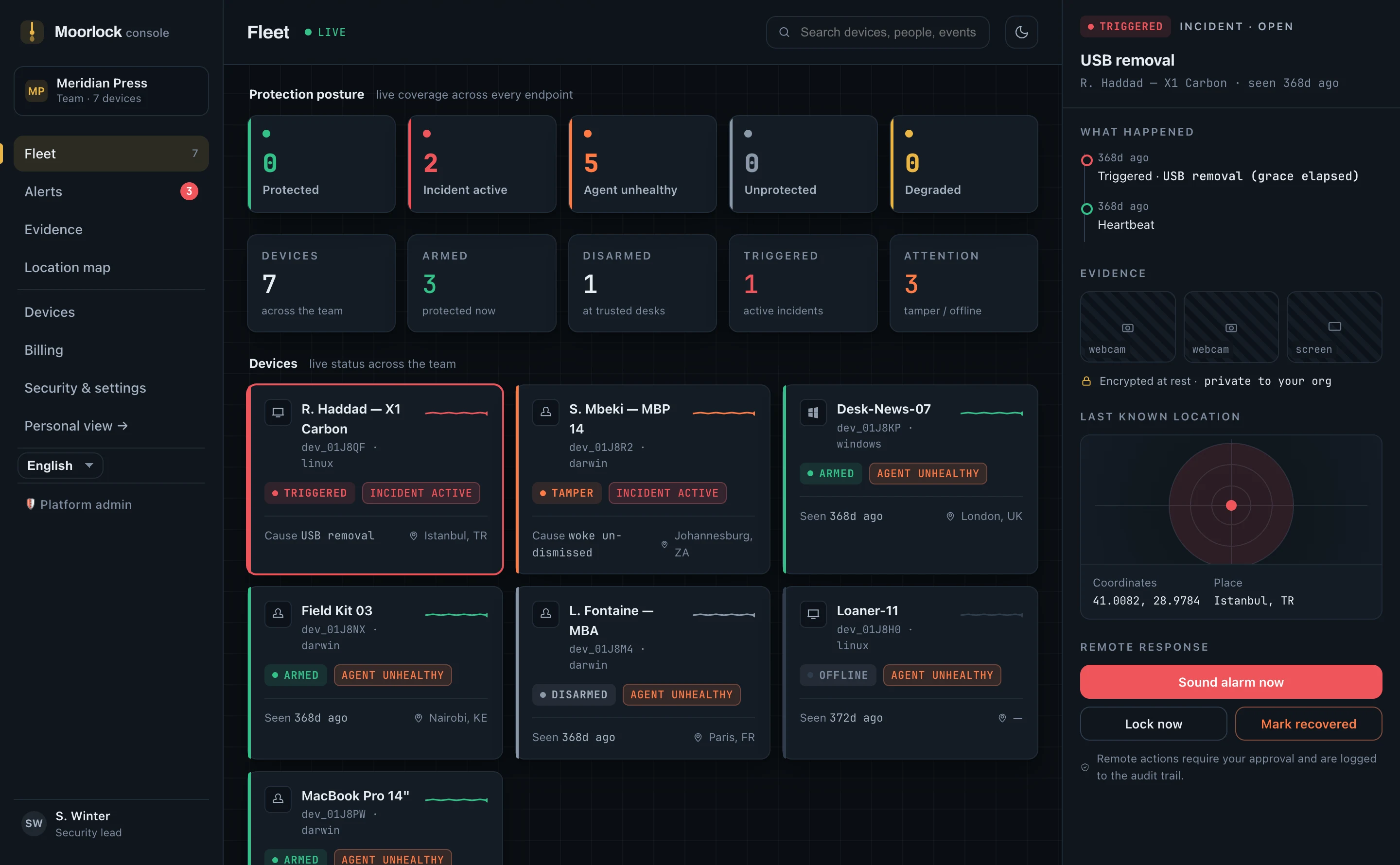
The hosted console shows live protection posture, incident timelines, encrypted evidence and last-known location for every device — and lets you sound the alarm, re-arm or disarm remotely.
Free to protect. Paid to see everything.
The client is free and open source forever. The hosted console adds reporting, encrypted storage, and fleet control.
Free
- Every trigger & protection factor
- Your own alert channels
- Local evidence capture
- macOS · Linux · Windows
Personal Pro
- Everything in Free
- Encrypted evidence & location history
- Push alerts & remote panic
- Up to 3 devices
Team
- Everything in Pro
- Fleet dashboard & roles
- Audit log & SSO
- Priority support
Before you tether in
Does it work offline?
Yes. Detection, lock, alarm and shutdown run entirely on the device — no network involved. Alerts and location reports queue while you're offline and deliver when connectivity returns.
What if I forget to disarm before unplugging?
An optional grace period forgives a knock or an honest unplug — reconnect within it and nothing fires. You can also disarm in one action, and auto-arm rules mean you only arm when it matters: on wake, on battery, or off trusted Wi-Fi.
What do I get without paying?
The whole protection engine, forever. Every trigger, every protection factor, local evidence capture and your own alert channels are free and open source. Paying adds the hosted console: encrypted evidence and location history, push alerts, remote actions and fleet management.
Can't a thief just wipe the machine?
No software can stop a wipe — that's what disk encryption is for, and we recommend FileVault or BitLocker alongside Moorlock. What Moorlock protects is the moment of theft: your unlocked session and data are locked away before they can be used, and evidence and location are captured while they still can be.
What hardware do I need?
None that you don't already own. Any magnetic-breakaway USB cable, FIDO2 security key, your phone or watch over Bluetooth, the power adapter, or a plain USB drive can be the tether. Bring your own, or buy a cable from any hardware vendor.
Who can see my evidence and location?
Only your account. Evidence and location are encrypted at rest with a per-organisation key. Our servers can decrypt them to show them in your dashboard — we say that plainly rather than claim end-to-end encryption. The client is open source, so you can verify exactly what leaves your machine.
Don't wait for the grab.
Set up in under a minute with a guided dry-run. Then tether in, and stop thinking about it.